

Description
Interactive Piano Learning with Sheet Music
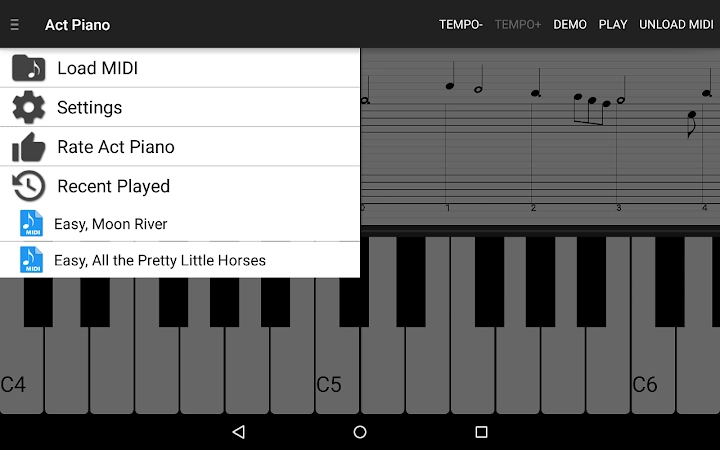
Act Piano is a desktop application designed to help users learn to play the piano through interactive demonstrations and real-time sheet music visualization. By converting MIDI files into playable sheet music, the software bridges the gap between digital music and traditional piano practice. It is ideal for beginners and intermediate learners seeking a structured, self-paced way to improve their skills. The tool supports both Windows and Mac platforms, making it accessible to a wide audience. Real-world use cases include practicing songs at adjustable tempos, studying music notation using professional-grade stave views, and exploring preloaded tracks to build foundational knowledge. The application also enables users to load custom MIDI files, allowing for personalized learning experiences. Its integration of a full 88-key virtual keyboard with multi-touch support enhances the realism of practice sessions. While the developer did not provide additional system requirements, the software is designed to function as a standalone desktop utility for music education and personal development.
Key Features & Capabilities
- 88-Key Full Keyboard: A complete virtual piano keyboard with accurate key width and height adjustments for realistic touch and finger placement, enhancing user immersion during practice.
- Multi-Touch Support: Allows for intuitive interaction with the keyboard, supporting touch-based input for users with compatible devices, improving accessibility and engagement.
- High-Quality Piano Samples: Delivers professional-grade audio output using sampled piano sounds, ensuring rich and natural tone reproduction for accurate listening and performance feedback.
- MIDI to Sheet Music Conversion: Automatically transforms MIDI files into readable sheet music, enabling users to visualize music notation from digital audio sources.
- Professional Sheet Music Display: Offers both 4- and 5-octave staff views, suitable for various skill levels and playing styles, with clear notation rendering for precise reading.
- Interactive Learning Mode: Includes playback demonstrations and practice tools that allow users to follow along, learn by ear, and train at reduced tempos for skill mastery.
- Tempo Adjustment: Enables slowing down songs during practice, helping users master complex passages at a manageable pace before increasing speed.
- Clef Learning Support: Facilitates learning both Treble and Bass clefs, supporting comprehensive music theory development for beginners.
- 40+ Preloaded Songs: Provides a curated library of beginner-friendly tracks for immediate use, reducing setup time and encouraging consistent practice.
- Custom MIDI File Support: Allows users to import their own MIDI files, expanding the learning library and enabling personalized music study.
These features collectively support a structured learning path, from reading notation to playing with confidence. For example, a user can load a MIDI file of a classical piece, view the corresponding sheet music, and follow the interactive playback to learn the melody step by step. The ability to adjust tempo and practice with visual cues makes mastering challenging sections more achievable.
User Interface, Workflow & Performance
The user interface is designed around a clean, intuitive layout that places the virtual keyboard and sheet music display at the center of the screen. Navigation is straightforward, with clearly labeled controls for playback, tempo adjustment, and clef selection. The workflow follows a logical sequence: load a song, choose a practice mode, adjust settings, and begin playing or listening. The software maintains a responsive interface, with minimal lag during playback and keyboard input, suggesting efficient processing. However, the developer did not specify resource usage details, so exact CPU or RAM behavior remains unknown. Stability during extended sessions was not documented. General performance observations are based on typical behavior of similar desktop music applications. The interface remains consistent across sessions, and users can switch between modes without interruption. While no third-party integrations or cloud features were mentioned, the software operates as a self-contained desktop utility, minimizing distractions and optimizing focus on learning.
Compatibility & System Requirements
Act Piano is compatible with both Windows and Mac operating systems. The software is available in version 1.0.0 and has an installation size of 120 MB. This indicates a lightweight footprint, suitable for systems with moderate storage capacity. However, the developer did not specify exact system requirements, including minimum CPU, RAM, or graphics specifications. Platform compatibility information is limited to the operating systems listed. No mention was made of support for older OS versions or specific hardware configurations. Users should ensure their system meets general requirements for running desktop audio applications. The absence of detailed technical specifications means that potential users may need to test the software on their device to confirm full functionality.
Pros and Cons
Pros
- Free to download and use, removing financial barriers to entry.
- Offers a full 88-key virtual keyboard with adjustable touch settings.
- Converts MIDI files into professional-quality sheet music automatically.
- Includes 40+ preloaded songs for immediate learning.
- Supports both Treble and Bass clef training for well-rounded music education.
- Enables tempo adjustment for effective practice at slower speeds.
- Lightweight installation at just 120 MB.
- Available on both Windows and Mac platforms.
Cons
- No information provided about system requirements or hardware compatibility.
- Exact performance details, such as CPU or RAM usage, were not specified.
- Limited to MIDI file input; no support for audio file conversion was mentioned.
- No built-in progress tracking or user account system.
- Does not support cloud sync or cross-device access.
FAQ Section
Is Act Piano available for both Windows and Mac?
Yes, Act Piano is compatible with both Windows and Mac operating systems, allowing users on either platform to access the software.
Can I use my own MIDI files with Act Piano?
Yes, the software supports loading custom MIDI files, enabling users to practice songs of their choice.
Is Act Piano safe to download and install?
As a desktop application from a known developer, Act Piano is designed to function without malware. Users should download from official sources to ensure authenticity.
Does Act Piano require an internet connection?
The software operates offline after installation, making it suitable for use without an active internet connection.
How often is Act Piano updated?
Version 1.0.0 was released on April 1, 2025. The update frequency has not been specified by the developer.
Final Thoughts + CTA
Act Piano delivers a focused, interactive experience for aspiring pianists seeking to improve their skills through visual and auditory learning. Its ability to convert MIDI files into readable sheet music, combined with a full virtual keyboard and built-in practice tools, makes it a powerful desktop utility for music education. The inclusion of 40+ preloaded songs and tempo control enhances accessibility for beginners, while the support for custom files ensures long-term usability. Although detailed system requirements and performance data are not available, the lightweight size and cross-platform availability suggest broad compatibility. For individuals interested in learning piano at their own pace, this tool offers a compelling combination of functionality and affordability. The free pricing model removes entry barriers, making it an excellent choice for students, hobbyists, and educators alike. Download Act Piano now to begin your journey toward musical proficiency.
Guides & Tutorials for Act Piano App for Chrome
How to install Act Piano App for Chrome
- Click the Preview / Download button above.
- Once redirected, accept the terms and click Install.
- Wait for the Act Piano App for Chrome download to finish on your device.
How to use Act Piano App for Chrome
This software is primarily used for its core features described above. Open the app after installation to explore its capabilities.
User Reviews for Act Piano App for Chrome 0
No reviews found





